


FIFA Music Player
FIFA Music Player


🧲 Snaps on magnetically
🎵 Load any song you want
📵 No wifi required
-
Ordered
- - -
Order Ready
- - -
Delivered
📦 What's included?
📦 What's included?
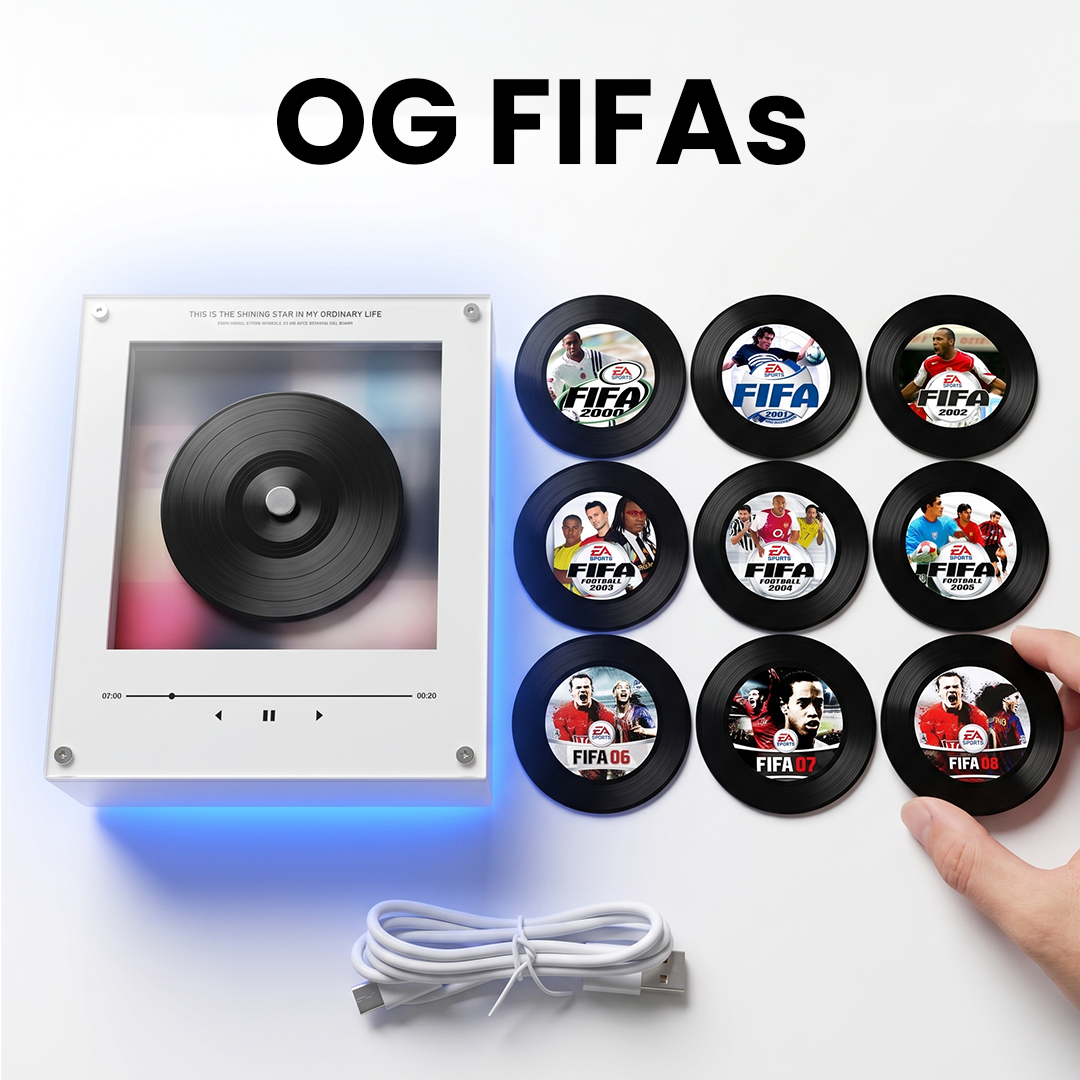
- FIFATunes Music Player
- 9x Magnetic FIFA themed discs
- USB-C charging/data cable
- Free worldwide shipping
✈️ Shipping and Delivery
✈️ Shipping and Delivery
We offer FREE WORLDWIDE SHIPPING
Orders take just under a week to make and 2-3 weeks to ship.
Fast track shipping can save you up to 10 days of shipping time depending on where you live.
🌟 30-Day guarantee
🌟 30-Day guarantee
Yes, we offer a free 30-day guarantee for added peace of mind. If you’re not satisfied, contact us within 30 days of receiving your order.
🎁 What's in my Mystery Gift?
🎁 What's in my Mystery Gift?
Anything from stickers, collectible trading cards and even replica woldcup footballs ✨


FREE SHIPPING WORLDWIDE✈️
SALE ENDS TODAY!⏰
FREE SHIPPING WORLDWIDE✈️
SALE ENDS TODAY!⏰
FREE SHIPPING WORLDWIDE✈️
SALE ENDS TODAY!⏰
FREE SHIPPING WORLDWIDE✈️
SALE ENDS TODAY!⏰
FREE SHIPPING WORLDWIDE✈️
SALE ENDS TODAY!⏰
FREE SHIPPING WORLDWIDE✈️
SALE ENDS TODAY!⏰
FREE SHIPPING WORLDWIDE✈️
SALE ENDS TODAY!⏰
FREE SHIPPING WORLDWIDE✈️
SALE ENDS TODAY!⏰
FREE SHIPPING WORLDWIDE✈️
SALE ENDS TODAY!⏰
FREE SHIPPING WORLDWIDE✈️
SALE ENDS TODAY!⏰
FREE SHIPPING WORLDWIDE✈️
SALE ENDS TODAY!⏰
FREE SHIPPING WORLDWIDE✈️
SALE ENDS TODAY!⏰
FREE SHIPPING WORLDWIDE✈️
SALE ENDS TODAY!⏰
FREE SHIPPING WORLDWIDE✈️
SALE ENDS TODAY!⏰
FREE SHIPPING WORLDWIDE✈️
SALE ENDS TODAY!⏰
FREE SHIPPING WORLDWIDE✈️
SALE ENDS TODAY!⏰
What do our customers think?
Rated 4.6 stars from 400+ reviews
Feel like a kid again
Load your own favourite FIFA-era tracks, snap on a magnetic disc, and relive those perfect memories again.
The songs you grew up with.
The covers you remember.
The feeling of being back after school, controller in hand, no stress.
Wait, it comes with no music?
We ship completely empty, on purpose. No songs chosen for you.
You upload whatever songs you like— and with room for around 42 songs, that's your favourites from every game, all in one place.
It's not "a player with some songs on it." It's your personal edition, Built by you, and you can change it up whenever you want.
FREE SHIPPING WORLDWIDE✈️
SALE ENDS TODAY!⏰
FREE SHIPPING WORLDWIDE✈️
SALE ENDS TODAY!⏰
FREE SHIPPING WORLDWIDE✈️
SALE ENDS TODAY!⏰
FREE SHIPPING WORLDWIDE✈️
SALE ENDS TODAY!⏰
FREE SHIPPING WORLDWIDE✈️
SALE ENDS TODAY!⏰
FREE SHIPPING WORLDWIDE✈️
SALE ENDS TODAY!⏰
FREE SHIPPING WORLDWIDE✈️
SALE ENDS TODAY!⏰
FREE SHIPPING WORLDWIDE✈️
SALE ENDS TODAY!⏰
FREE SHIPPING WORLDWIDE✈️
SALE ENDS TODAY!⏰
FREE SHIPPING WORLDWIDE✈️
SALE ENDS TODAY!⏰
FREE SHIPPING WORLDWIDE✈️
SALE ENDS TODAY!⏰
FREE SHIPPING WORLDWIDE✈️
SALE ENDS TODAY!⏰
FREE SHIPPING WORLDWIDE✈️
SALE ENDS TODAY!⏰
FREE SHIPPING WORLDWIDE✈️
SALE ENDS TODAY!⏰
FREE SHIPPING WORLDWIDE✈️
SALE ENDS TODAY!⏰
FREE SHIPPING WORLDWIDE✈️
SALE ENDS TODAY!⏰
HOW IT WORKS
1. Plug in & drop your songs on
Connect via USB-C and drag your tracks across. All the music stores in the box itself — so you can load every disc with as many songs as you like, up to ~42 total.
2. Upload the songs
Open the drive and you'll see 9 folders, numbered 01–09 — one per disc. Drag your MP3s into the folders you want. Each numbered folder plays on its matching disc, so folder 03 = disc 3.
3. Snap on a disc
The discs attach magnetically then It lights up and plays out loud. No phone, no wifi, no screen. Just pure memories.
Frequently Asked Questions
Does it come with music already on it?
Does it come with music already on it?
No — and that's the whole point. It ships empty so you load your exact tracks. Takes a couple of minutes over USB-C.
How many songs can it hold?
How many songs can it hold?
The box has 128MB of storage. Meaning around 42 full songs in MP3 format, give or take — enough for your favourites from every era at once. All the storage lives in the box, not the individual discs. You will see a folder for each disc when you connect the device to a computer/laptop.
What about battery life?
What about battery life?
It runs a couple of hours of continuous play on a charge — but here's the thing: it automatically sleeps the second you stop playing, so it isn't draining in between. In real-world use, that makes a charge last far longer than the on-paper number. Recharges fully in 10-20 minutes over USB-C.
Shipping & Delivery?
Shipping & Delivery?
We offer FREE WORLDWIDE SHIPPING
Orders take just under a week to make and 2-3 weeks to ship.
Fast track shipping can save you up to 10 days of shipping time depending on where you live.
In depth set-up guide
In depth set-up guide
This is how to link any Song to your FIFA Tunes Vinyls:
- Insert the Type-C end of the data cable into the charging port of the player, and plug the USB end into the USB port of the computer.
- Download songs in MP3 format from the internet.
- Open This PC on the computer and enter the corresponding removable disk.
- Inside the removable disk are folders numbered 01 to 09. Put the downloaded songs into the folders with matching numbers.
- Upload and back up the original MP3 files in each folder.
- If the computer fails to recognize or display the removable disk, replace it with your regular data cable and reconnect again.
Works on Mac & Windows. No app or driver install needed.